Case Study

MARCAVO

Designed and built an entire client management platform from the ground up — frontend, backend, APIs, billing, and admin tools — as a solo product designer and developer.

Industry
SaaS / Client Management
Role
Designer & Developer
Platform
Web App
Timeline
1 Month
Status
Beta
Company
Marcavo
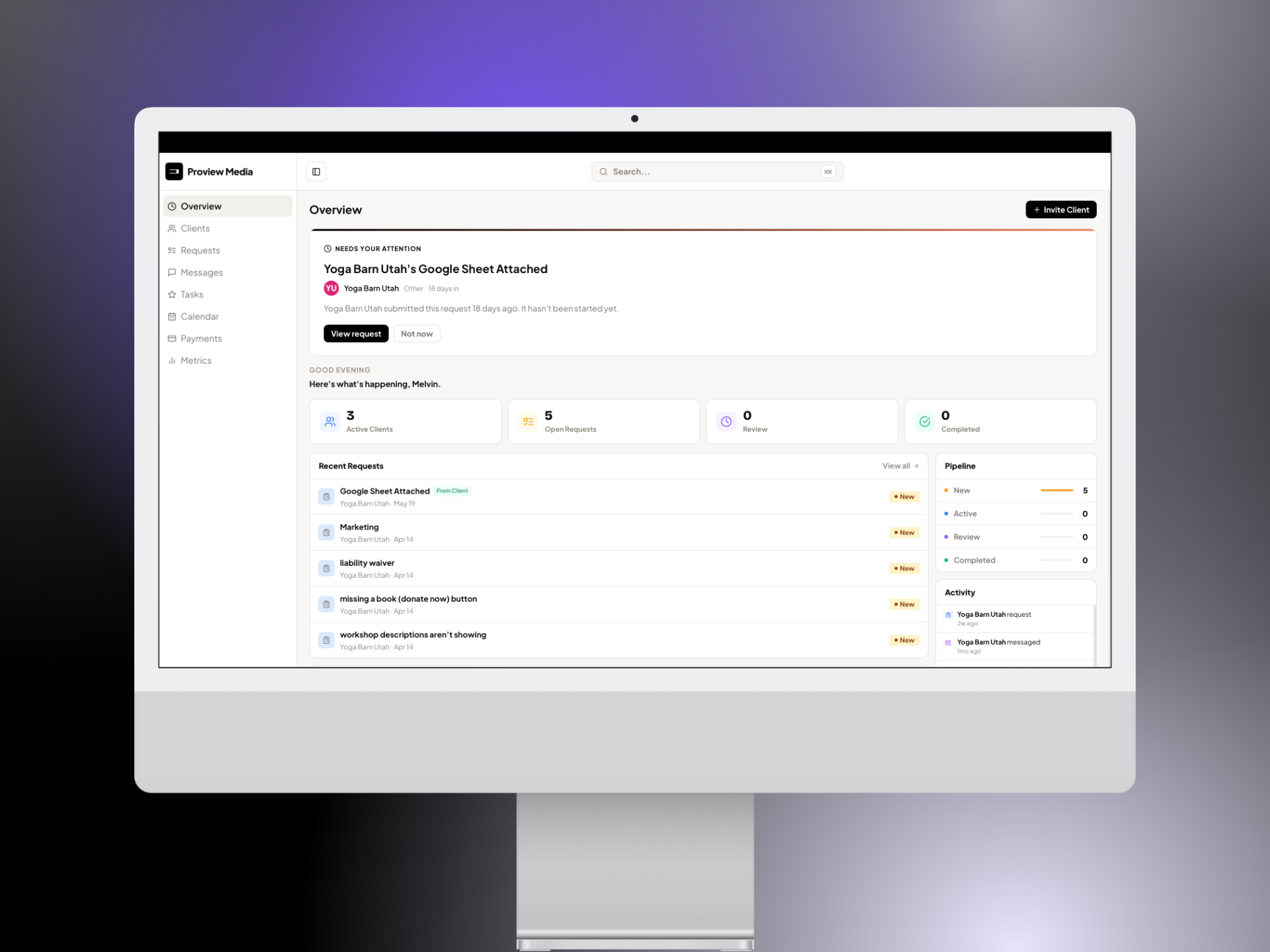
Marcavo Platform Overview
01 — Overview

Built for the people
who do the real work

I’ve been in this space. I’ve been the freelancer juggling client emails, chasing invoices, and trying to look professional with a patchwork of tools that don’t talk to each other. I’ve been the photographer sending contracts through one app, invoices through another, and project updates through a third. The market for freelancers, photographers, videographers, designers, and small agencies is thriving — but the tools haven’t kept up.

So I built Marcavo. In one month. From scratch. Every screen, every API call, every database table. The platform runs on Next.js 14 with TypeScript on Vercel, Supabase for auth, database, and storage, Stripe Connect for payments, Tailwind CSS, PostHog for analytics, and Sentry for error tracking. Calendar sync works with Google, Outlook, Apple Calendar, and CalDAV.

The core idea was simple: make things simple again. One login, one dashboard, one place where the client-admin relationship just works. An admin view to manage your business and a client portal that makes your clients feel taken care of — without the complexity. No bloat, no enterprise pricing, no features nobody asked for.

I also designed and built the marketing website at marcavo.com — the landing page, pricing page, feature breakdowns, and all conversion flows. Every touchpoint a user sees, from first visit to onboarded client, was designed and shipped by me.

Visit Marcavo
Next.js 14 TypeScript Supabase Stripe Connect Tailwind CSS PostHog Sentry Vercel Product Design
Marcavo Logo
1 mo
From zero to beta — designed, developed, and shipped the entire platform in one month
8+
Core features shipped — messaging, invoicing, projects, calendar, file sharing, analytics, white-label, and more
2
Distinct roles — Admin (freelancer/agency) and Client (customer) each with purpose-built interfaces
02 — Problem

The tools were built
for the wrong people

I looked at every client management tool out there — HoneyBook, Dubsado, Bonsai, you name it. They were either built for enterprise teams with budgets to match, or they were so stripped down they couldn’t handle a real workflow. The freelancers, the photographers, the small agencies actually doing the work — they were stuck duct-taping five different tools together and calling it a system.

The client-admin relationship should be simple. A client should be able to log in, see their project, pay their invoice, and message their person — all in one place. And the admin should be able to manage everything without switching tabs. That’s not a big ask. But nobody was building it for the little people, so I did.

I just want one place where my clients can see what’s happening, pay me, and message me. I don’t need a project management suite — I need something that actually works for how I run my business.
Beta user — Freelance photographer, 6 years experience
03 — Persona

Who we designed for

Sofia Chen - Freelance Designer
Sofia Chen
Freelance Brand & Web Designer
Age
31
Location
Los Angeles, CA
Clients
8 – 12 active
Experience
6 years freelancing
Goals
Present a professional, branded experience to clients
Get paid faster with less chasing
Spend more time on creative work, less on admin
Frustrations
Juggling 5+ tools that don't talk to each other
Clients lose track of files and project status
Invoicing feels like a separate, tedious workflow
Behaviors
Checks project management board 10+ times daily
Sends weekly status update emails manually
Uses separate brand assets for client-facing docs
04 — Research

What we discovered

🔍
Tool Fatigue Is Real
87% of freelancers surveyed said they use 4 or more separate tools to run their business. Over half reported that context-switching between tools was their single biggest productivity drain.
💬
Clients Want Transparency
Clients don't want to send "just checking in" emails. They want a place to log in and see project status, files, and invoices on their own terms — without waiting for a response.
🎨
Brand Perception Matters
Freelancers care deeply about how they appear to clients. 72% said they would pay more for a tool that let them white-label the client experience with their own logo, colors, and domain.
05 — Process

How I built it

01
Phase 01
Architecture Planning
Mapped out the entire system before writing a line of code. Defined the data model, API surface, auth flows, and third-party integrations. Chose Next.js for the frontend, Supabase for the backend, and Stripe for billing — a stack optimized for speed and scalability as a solo builder.
02
Phase 02
Database Design
Designed the full relational schema in Supabase — users, organizations, projects, invoices, messages, files, and white-label configs. Set up row-level security policies, database functions, and real-time subscriptions to power live updates across the platform.
03
Phase 03
API Integration & Frontend Dev
Wired up Stripe for invoicing and payment processing, Google OAuth for authentication, and Google Calendar for scheduling. Built every page and component in Next.js — the admin dashboard, client portal, invoicing flows, messaging UI, and white-label customization engine.
04
Phase 04
User Testing & Iteration
Put the live product in front of real freelancers and iterated based on their feedback. Refined navigation patterns, simplified the invoicing flow, and polished the white-label setup experience. Shipped continuously — testing, fixing, and deploying in tight loops.
06 — Solution

What we shipped

Every feature was designed around two roles: the Admin (the freelancer or agency running their business) and the Client (their customer using the portal). Here’s what’s live in beta:

Client Portal
A branded portal where clients submit requests, message you, pay invoices, upload files, and book meetings — all under your logo and colors.
Project Management
Request tracking with statuses (New → In Progress → Review → Done), subtasks, file attachments, due dates, and priority levels.
Real-time Messaging
Threaded conversations with file sharing, voice notes, and read receipts. No more lost emails or missed Slack messages.
Invoicing & Payments
Create, send, and track invoices with Stripe Connect. Recurring billing, payment tracking, line items, and real-time status updates.
Calendar Sync
Google, Outlook, Apple Calendar, and CalDAV integration with built-in meeting booking. Clients book time directly from the portal.
Project Wraps
Beautiful handoff pages sent to clients when a project is complete. A polished final deliverable that closes the loop professionally.
White-labeling
Custom logo, brand colors, and workspace name so the portal looks like your own product — not a third-party tool.
Analytics Dashboard
Revenue tracking, project completion rates, and client health monitoring. Know how your business is doing at a glance.

Pricing: Free tier (3 clients, 500MB storage) and Pro tier (unlimited clients, 10GB, payments, white-labeling). Built to grow with the freelancer.

Marcavo Dashboard
07 — Outcomes

Real product, real results

Live Platform at marcavo.com
Marcavo is not a concept or a case study mockup — it is a live, production product. The full platform is deployed on Vercel with a Supabase backend, available for freelancers to sign up and start using today.
Stripe Payments Processing
Real money moves through the platform. The Stripe integration handles invoice creation, online payments, and payment tracking end to end — a fully functional billing system built from the API up.
White-Label Portals Active
Freelancers are running branded client portals through Marcavo with their own logos, colors, and custom domains. Each portal is a distinct experience powered by the same underlying infrastructure I built.
Solo-Built, Production-Grade
Every layer of the stack — database schema, API routes, auth flows, real-time messaging, frontend components, deployment pipeline — was designed and implemented by one person. The codebase is clean, maintainable, and built to scale.
08 — Learnings

What I took away

01
Wearing Every Hat Forces Better Decisions
When you are the designer, the developer, and the product manager, every decision carries real weight. There is no handoff to hide behind. I learned to think in systems — how a database schema choice affects the UI, how an API design impacts the user experience, how deployment constraints shape product scope.
02
System Design Thinking Is Everything
Building a multi-surface product solo taught me that architecture is design. The way data flows between Supabase, Next.js, and Stripe determines what is possible in the interface. Getting the system design right early saved me months of rework and made every feature faster to build.
03
Ship Iteratively, Perfectionism Kills Products
I shipped Marcavo in waves — core auth first, then projects, then invoicing, then messaging, then white-label. Each release taught me something the previous one could not. Waiting for perfection would have meant never launching. The best product decisions came from real users touching real software.
Next Project
SEVN App